 Speed Patterns


Convert on Arrival
Rich interactive components — carousels, tabbed panels, video players, maps, comparison sliders — are valuable, but they bring along a lot of code and data. Waiting for all of it to load before showing anything leaves the user staring at a blank container.
The Problem
A typical "above the fold" carousel illustrates the issue well. To work, it needs:
- Multiple images (or video frames)
- JavaScript for navigation, touch handling and autoplay
- CSS for layout and transitions
- Often, font and analytics dependencies
Until all of that arrives, the user either sees nothing, sees a spinner, or sees a janky half-loaded version that shifts as code initializes. Yet 90% of the visible value of a carousel is its first slide — the one the user sees on arrival.
Solution
The static placeholder ships in the first HTML response; the carousel "converts" into its full interactive form once the supporting code arrives, without changing size.
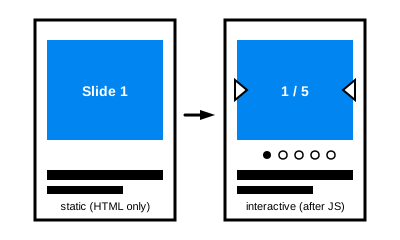
Render the simplest possible static representation of the component immediately, using only HTML and CSS. Then progressively enhance it into the full interactive version as the supporting code and data arrive.
For a carousel:
- Render the first slide as a plain image (or HTML block) at the correct dimensions
- Once the carousel JavaScript and remaining slides are downloaded, convert the static element into the full interactive carousel — without any layout shift
- The transition from static to interactive should be visually invisible to the user
The same pattern applies broadly:
- Video players — show the poster image with a play button immediately; load the player on click or when idle
- Maps — show a static map tile or screenshot first; swap for an interactive map when the library loads
- Tabbed panels — render the active tab's content as plain HTML; attach tab-switching behavior later
- Tables with sort/filter — render the rows server-side; attach client-side controls progressively
Why This Works
The dominant use of an interactive component is often passive consumption of its default state. By optimizing for that default state, you get:
- Faster first paint — no JavaScript blocks the initial render
- Faster Largest Contentful Paint (LCP) — the hero image arrives in the first HTML response
- No layout shift — sizes are fixed in the static markup before any code runs
- Resilience — if scripts fail or are slow, the user still sees usable content
Guidelines
- Match dimensions exactly. The static placeholder must occupy the same space as the final component to avoid layout shift
- Make the static state useful, not decorative. It should be the real first slide, the real hero image, the real default tab — not a generic placeholder
- Don't compete with the critical path. The upgrade should wait until the rest of the page is settled, so it doesn't fight for resources during the most important part of load
- Test the static-only experience. Disable JavaScript and confirm the page is still presentable and on-brand
Related Patterns
- Fast Start — getting that first paint up quickly is what makes this pattern pay off
- Immutable Layout — the upgrade must not shift the page
- Skeletal Designs — for parts of the UI where no useful static representation exists
Technical Implementation
Defer the upgrade until the page is no longer fighting for resources. Useful primitives:
requestIdleCallback— schedule the upgrade for an idle slice of the main threadIntersectionObserver— only upgrade components that are actually visible (or about to be)- Interaction-based loading — wait until the user hovers, focuses, or clicks the static placeholder before downloading the heavier interactive code
- Dynamic
import()— code-split the interactive implementation so it isn't part of the critical bundle
The static placeholder should be authored as plain HTML at the correct final dimensions; the upgrade script then mounts the interactive version into (or in place of) that container without changing its size.